
From Audio Ease Software
What's Snapper ?
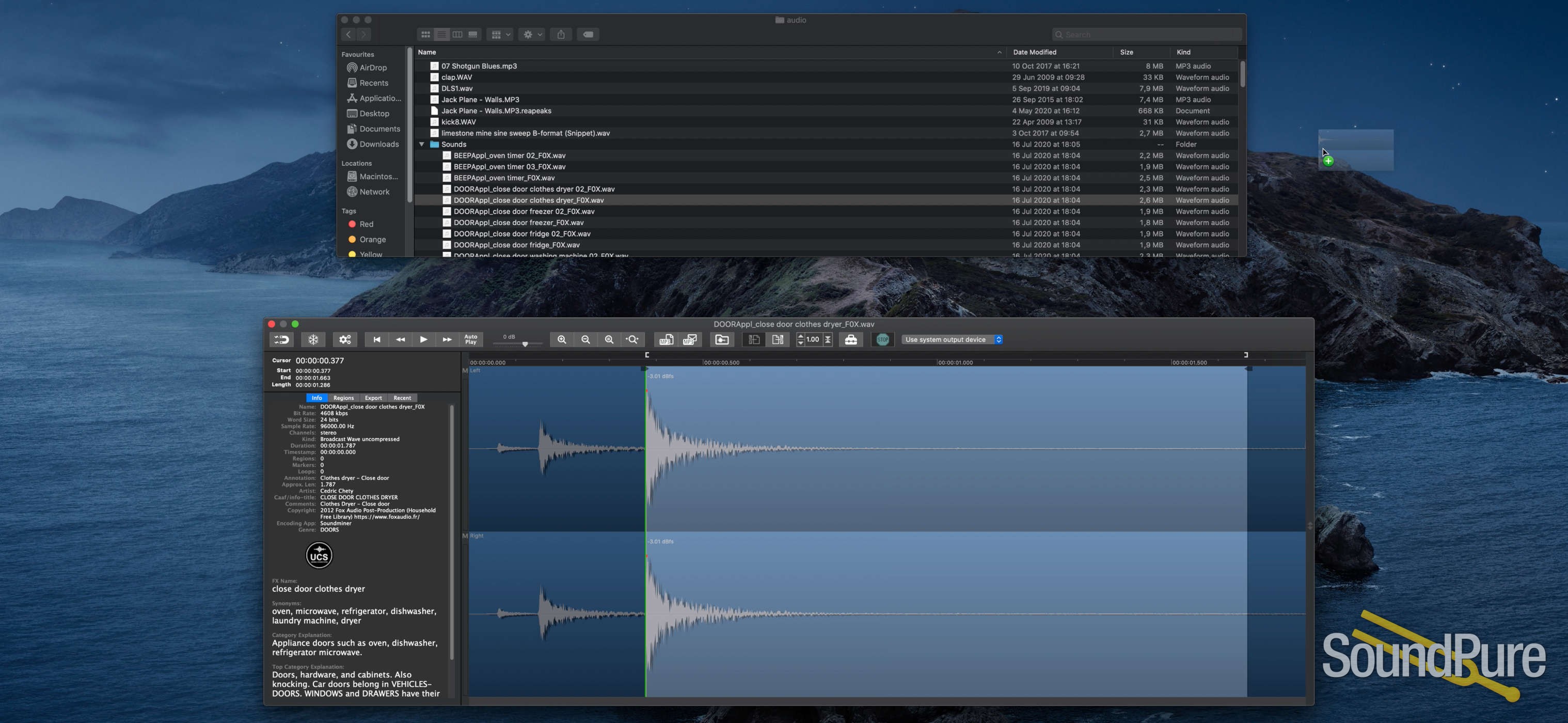
When you select an audio file in the Mac Finder, Snapper immediately appears right beneath the current window, showing you the wave form.
Play
Hit the space bar or double-click in the wave form to play. Or use auto-play to start playing the moment you select the file. Vari-speed is available too.
Drag, Drop and Convert
In the Snapper wave form you can select a part of the sound file and:
- drag it out, to create a new file.
- drag it to any DAW, sequencer or audio editor
- turn the selection into an mp3 file. (or m4a)
- split interleaved stereo files into separate .L and .R file sets or vise versa
- convert to m4a and attach it to an email in one go.
- export to WAV (BWF, Broadcast Wave), mp3, or m4a (MPEG-4 audio).
Which formats can it handle?
All of them.
Snapper opens over 50 sound file formats. That includes compressed files, split stereo, 192 kHz, 5.1 surround files, cds and videos containing audio. Snapper shows loops, markers, timestamps, regions, BWF annotations, even album covers. You name it, Snapper can handle it. For some formats you need to install external components, here's more on that.
Finder
Snapper follows your file selection in the Finder. It shows a wave form as soon as you select an audio file.
Pro Tools, Nuendo, Logic, Cubase, Live
You can drag (selections from) files directly to the cursor of your sequencer or audio editor.
Copy Protection
After purchase you receive a personal activation code to unlock the Snapper demo.
What does the demo do ?
Everything, for one hundred (100!) days. After that it simply stops working. You can download the demo here.
Snapper ❤️ SoundFX
Snapper now adds an informer that communicates all metadata within WAV files to MacOS Spotlight, so you can search and find Sound FX metadata in the Finder. This includes, BEXT, Copyright, creator, annotations, comments etc.
On top of that Snapper embeds the Universal Category System so you can look for synonyms and category explanations. Snapper displays the entire category and subcategory names, rather than their abbreviations.
The Spotlight informer requires at least MacOS 10.14 Mojave. It takes a while for your library to be rescanned by spotlight, but you can trigger priority for you sound FX library by adding it’s top level folder to to the ‘privacy’ list in System Preferences Spotlight, and then removing it again form the list.
System requirements
- Mac OS X
The latest Snapper 3 requires:
- macOS 10.12 (Sierra) or higher, macOS 15 (Sequoia), 14 (Sonoma) and 13 (Ventura) are fully supported
- optionally some third party codecs
Free 3-Year Warranty
Sound Pure stands behind our products. Free three-year warranty on this item. Coverage exclusions live in Terms & Conditions, Section 27.
Level of support and expertise that simply isn't available at big-box megastores. Read the warranty →
Returns
Not eligible for Try Before You Buy or the 48-hour approval period. Standard return policy applies — see Terms & Conditions, Section 18 for details.
Recommended accessories

Sound Pure Studios · Durham, NC
Come hear it in our control rooms.
Sound Pure is a working studio in Durham, NC — a 1,000 sq ft live room and two pro control rooms. Book a session to audition gear in a world-class acoustic space before you buy.